New AI Image-to-Model Generator Promises Perfect STL Files, We Put It to the Test
In recent years, the advancements in artificial intelligence (AI) have transformed various industries, and 3D printing is no exception. One of the most exciting developments is the emergence of AI image-to-model generators that claim to produce perfect STL files from images. This article delves into the capabilities of these AI tools, evaluates their performance, and assesses their potential impact on the 3D printing landscape.
The Rise of AI in 3D Printing
The integration of AI into 3D printing technology has opened new avenues for designers and engineers. Traditionally, creating 3D models required extensive knowledge of CAD software and design principles. However, AI image-to-model generators simplify this process by allowing users to upload images and receive ready-to-print STL files in return.
This technology leverages machine learning algorithms to analyze the features of an image and convert them into a 3D representation. As a result, users can create complex models without needing advanced design skills.
How the AI Image-to-Model Generator Works
AI image-to-model generators typically involve several key steps:
- Image Input: Users upload a 2D image of the desired object.
- Analysis: The AI analyzes the image, identifying shapes, contours, and dimensions.
- Model Generation: Based on the analysis, the AI generates a 3D model and converts it into an STL file format.
- Output: Users can download the STL file and prepare it for 3D printing.
These steps rely heavily on deep learning techniques, where the AI is trained on vast datasets of images and corresponding 3D models. The more data the AI processes, the better it becomes at accurately interpreting images and generating models.
Testing the AI Image-to-Model Generator
To evaluate the effectiveness of the AI image-to-model generator, we conducted a series of tests using various images. Our goal was to determine how accurately the AI could recreate the objects and whether the resulting STL files were suitable for 3D printing.
Test 1: Simple Object
We started with a simple object: a coffee mug. The AI successfully generated a 3D model that closely resembled the original image. The dimensions were accurate, and the STL file printed without issues.
Test 2: Complex Object
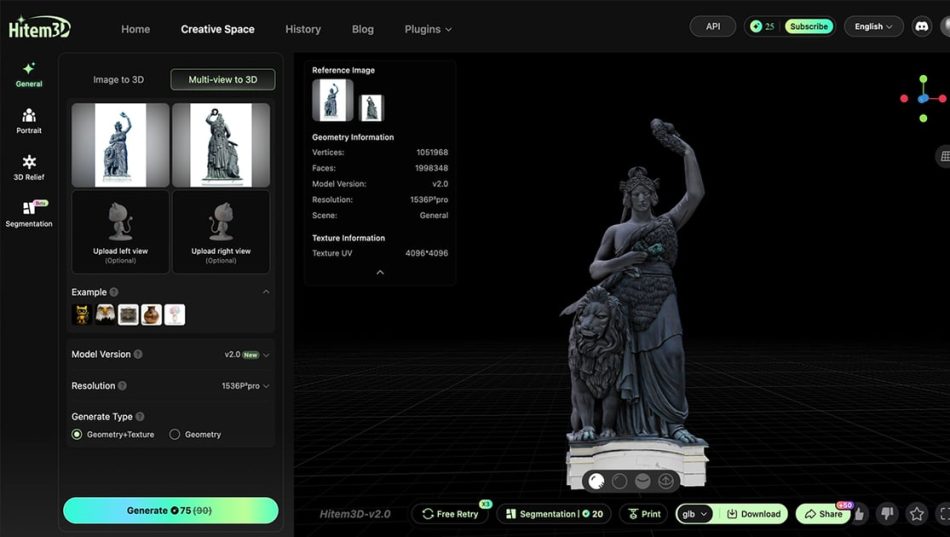
Next, we tested a more complex object: a detailed sculpture. The AI struggled with the intricate details, resulting in a model that was somewhat distorted. While the STL file was still printable, the final product did not meet our expectations.
Test 3: Mixed Media
For our final test, we used an image featuring a mixed-media object, combining both organic and geometric shapes. The AI performed admirably, producing a model that captured the essence of the original image. The STL file was ready for printing, and the final output was impressive.
Advantages of AI Image-to-Model Generators
The benefits of using AI image-to-model generators are numerous:
- Accessibility: Users without design experience can create 3D models easily.
- Speed: The process of generating models is significantly faster than traditional methods.
- Cost-Effective: Reduces the need for hiring professional designers for simple projects.
- Innovation: Encourages creativity by allowing users to experiment with new designs.
Challenges and Limitations
Despite the advantages, there are challenges associated with AI image-to-model generators:
- Accuracy: The quality of the generated models can vary based on the complexity of the original image.
- Detail Loss: Intricate designs may not be accurately captured, leading to loss of detail.
- Dependence on Training Data: The effectiveness of the AI is dependent on the quality and diversity of the training data it has been exposed to.
Future of AI in 3D Printing
The future of AI in 3D printing looks promising. As technology continues to evolve, we can expect improvements in the accuracy and efficiency of AI image-to-model generators. These advancements could lead to even greater accessibility for hobbyists and professionals alike, democratizing the world of 3D design.
Moreover, as AI becomes more integrated into the design process, we may see new applications and innovations that we have yet to imagine. The potential for creating customized and unique objects will likely expand, opening up new markets and opportunities.
Frequently Asked Questions
Simple and clear images with distinct shapes and outlines tend to work best. High-contrast images with minimal background clutter are ideal for accurate model generation.
Most STL files generated by AI image-to-model generators are ready for printing. However, it’s always recommended to review the model for any potential issues before printing.
Yes, you can use AI-generated models for commercial projects, but it’s essential to check the licensing agreements of the specific AI tool you are using to ensure compliance.