
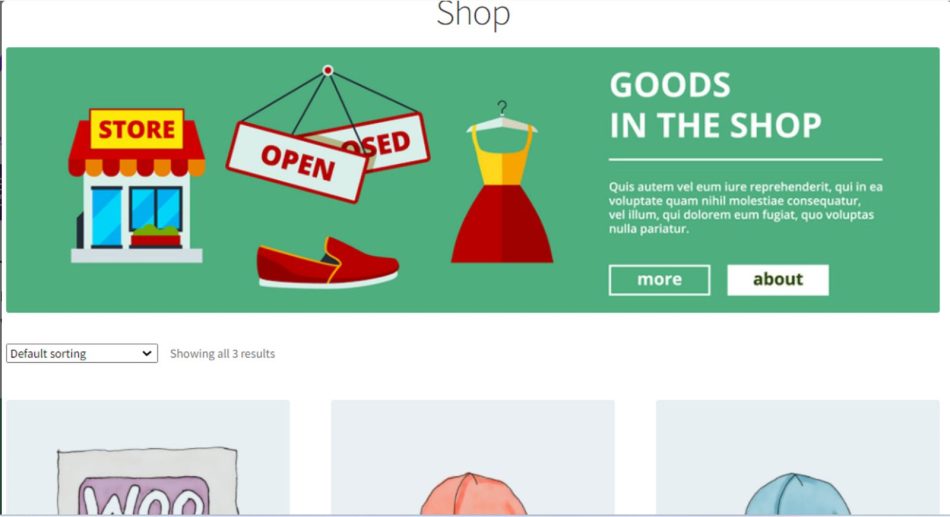
Banner Images For WooCommerce
In the competitive world of eCommerce, presentation is key. One of the most effective ways to enhance the visual appeal of your online store is through the use of banner images. The Banner Images for WooCommerce plugin offers a straightforward solution for store owners looking to utilize attractive banners on their WooCommerce sites. This article explores the benefits, features, and best practices for using banner images effectively in your WooCommerce store.
What is the Banner Images for WooCommerce Plugin?
The Banner Images for WooCommerce plugin is designed to help store owners easily add category banners to their WooCommerce pages. With this plugin, you can display eye-catching banners on various pages, including category pages, shop pages, and product pages. This functionality allows you to highlight sales, special offers, or important collections, making it easier for customers to navigate your store and find what they are looking for.
Benefits of Using Banner Images
Incorporating banner images into your WooCommerce store can significantly enhance user experience and engagement. Here are some of the key benefits:
- Attract Attention: Banners can draw attention to specific products or promotions, guiding shoppers to items you want to highlight.
- Professional Appearance: Well-designed banners contribute to a more organized and professional look for your store, which can build trust with customers.
- Enhanced User Experience: By providing visual cues, banners can improve navigation and make it easier for customers to find what they need.
- Increased Sales: Highlighting special offers or new arrivals can lead to increased sales and conversions.
How to Use Banner Images for WooCommerce
Using the Banner Images for WooCommerce plugin is straightforward. Here’s a step-by-step guide on how to set it up:
- Install the Plugin: Begin by installing the Banner Images for WooCommerce plugin from the WordPress plugin repository.
- Activate the Plugin: Once installed, activate the plugin through the ‘Plugins’ menu in WordPress.
- Add Banner Images: Navigate to the plugin settings to upload your banner images. You can choose images that represent your categories, promotions, or specific products.
- Configure Settings: Customize settings such as banner size, alignment, and links to ensure they fit seamlessly into your store design.
- Preview and Publish: Preview the changes on your site and make adjustments as necessary before publishing.
Best Practices for Banner Images
To maximize the effectiveness of your banner images, consider the following best practices:
- Use High-Quality Images: Ensure that the images you use are high-resolution and visually appealing to attract customers.
- Keep Text Minimal: If you include text on your banners, keep it concise and easy to read. The focus should be on the visual elements.
- Optimize for Mobile: Make sure your banners are responsive and look great on mobile devices, as many shoppers use their phones to browse online stores.
- Test Different Designs: Experiment with different banner designs and placements to see what resonates best with your audience.
- Update Regularly: Keep your banners fresh by updating them regularly to reflect current promotions or new product launches.
Conclusion
Incorporating banner images into your WooCommerce store can significantly enhance the shopping experience for your customers. By using the Banner Images for WooCommerce plugin, you can easily create and manage attractive banners that highlight important products and promotions. With the right approach, banner images can lead to increased engagement and sales, helping your online store thrive in a competitive market.
Frequently Asked Questions
You can create various types of banners, including category banners, promotional banners for sales, and banners for new arrivals or featured products. The plugin allows customization to fit your store’s design.
While there are no strict size requirements, it is recommended to use high-resolution images that fit well within your store’s layout. Common dimensions range from 1200×400 pixels to 1920×600 pixels, but you should adjust based on your theme.
Yes, the plugin allows you to add links to your banners, directing customers to specific products, categories, or even external sites, making it a powerful tool for driving traffic to desired areas of your store.
Note: Always ensure that your banners are aligned with your marketing strategy and reflect your brand’s identity for the best results.