Creator of Window's Task Manager shows off 'probably what Task Manager would look like if I were still around' — Tempest AI's retro-futuristic dashboard code shared to Github
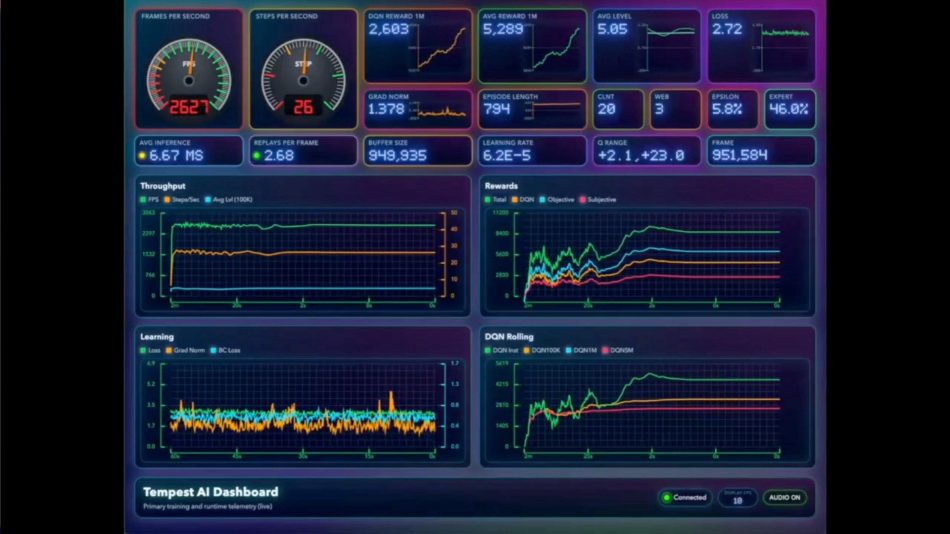
In a fascinating blend of nostalgia and innovation, Dave Plummer, the original creator of the Windows Task Manager, has unveiled a new dashboard design for his personal AI project, Tempest AI. This retro-futuristic interface is a playful nod to what the Task Manager might look like today if Plummer had continued his work with Microsoft.
Introduction to Tempest AI
Tempest AI is an ambitious project aimed at creating an AI that can outperform the classic Atari game, Tempest. The project showcases not only Plummer’s programming skills but also his unique vision for user interfaces in modern computing. By sharing the code and the design on GitHub, Plummer invites developers and enthusiasts to explore and contribute to his work.
The Dashboard Design
The newly designed dashboard reflects a retro-futuristic aesthetic, combining elements of 1980s design with modern functionality. Plummer shared a screenshot of the dashboard on social media platform X, emphasizing that this design is what he imagines the Task Manager would look like today.
In his post, he humorously remarked, “This is probably what Task Manager would look like (and sound like) if I were still around. Which is why it’s a good thing I knew to stay in my lane, design-wise.” This statement highlights his awareness of the evolving nature of software design and user experience.
Features of the Tempest AI Dashboard
The Tempest AI dashboard includes several innovative features that reflect Plummer’s vision:
- Live Display: The dashboard provides real-time updates and visualizations, making it easier for users to monitor the performance of their applications.
- Retro Aesthetic: The design incorporates bright colors and geometric shapes reminiscent of classic video games, appealing to both nostalgia and modern design sensibilities.
- Sound Integration: Plummer has included sound elements that enhance the user experience, making the dashboard not just functional but also engaging.
- Open Source Code: By sharing the code on GitHub, Plummer encourages collaboration and innovation within the developer community.
Impact on the Developer Community
Plummer’s decision to share the Tempest AI dashboard code on GitHub is significant for several reasons:
- Encouraging Innovation: By providing an open-source platform, Plummer allows developers to experiment, modify, and improve upon his design.
- Fostering Community Engagement: The project invites feedback and contributions from other developers, creating a collaborative environment where ideas can flourish.
- Reviving Interest in Retro Design: The retro-futuristic theme may inspire other developers to explore similar aesthetics in their projects, blending nostalgia with modern technology.
How to Access the Tempest AI Dashboard
For those interested in exploring the Tempest AI dashboard, it is available for live viewing on Plummer’s GitHub page. Users can interact with the dashboard and see the features in action. Additionally, the source code is accessible for anyone who wishes to delve deeper into the programming behind the project.
Conclusion
Dave Plummer’s reimagining of the Windows Task Manager through the Tempest AI dashboard is a testament to his creativity and understanding of user experience. By blending retro aesthetics with modern functionality, he not only pays homage to the past but also paves the way for future innovations in software design. This project serves as an inspiration for developers and designers alike, encouraging them to think outside the box and explore new possibilities in their work.
Frequently Asked Questions
Tempest AI is a personal project by Dave Plummer aimed at creating an AI that can outperform the classic Atari game, Tempest. It features a retro-futuristic dashboard designed to enhance user interaction.
The code for the Tempest AI dashboard is available on GitHub, where users can view, interact with, and contribute to the project.
The Tempest AI dashboard features a retro-futuristic design, real-time updates, sound integration, and is open source, allowing for community collaboration and innovation.
Note: This article reflects the latest developments as of February 2026 and is subject to change as the project evolves.